

Manage your entire CMS through natural language — create content, edit pages, run agents, deploy, and more by just talking to it.
What is Chat?
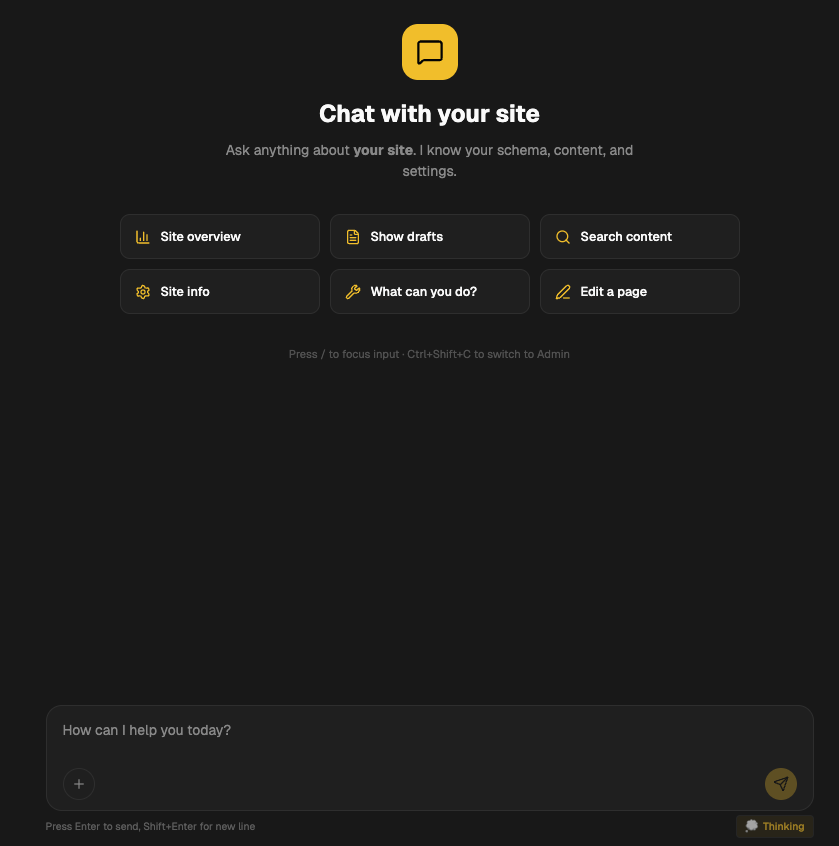
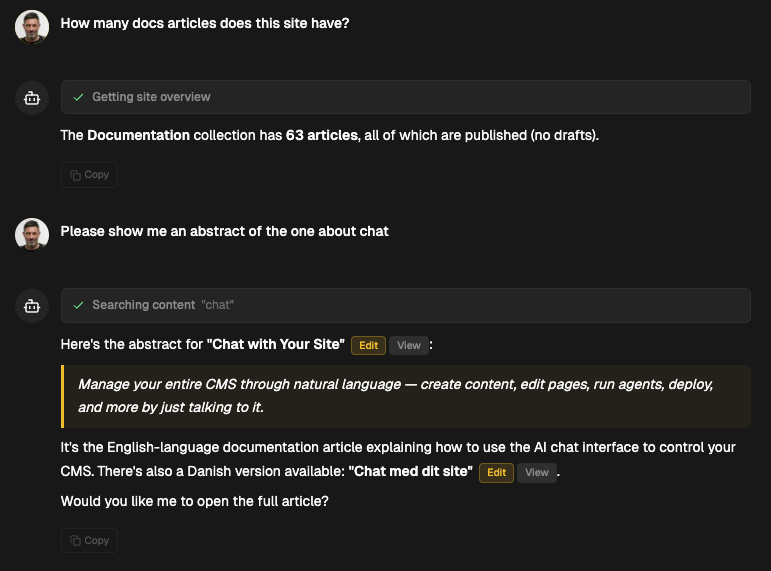
@webhouse/cms has a built-in conversational interface that lets you manage your entire site through natural language. Instead of clicking through menus and forms, you describe what you want and the CMS does it.
Click Chat in the admin header to switch from the traditional panel to the chat interface. Click Admin to switch back. Your chat history is preserved.
This isn't a chatbot bolted onto a CMS. The chat has direct access to 49 tools that cover every CMS operation — the same APIs that power the traditional admin UI. It can read your schema, understand your collections, and execute operations with full context.
What you can do
Content management
"Create a new blog post about TypeScript generics"
"Update the about page title to 'About Us'"
"Publish all drafts"
"Show me what changed this week"
"Translate the getting-started page to Danish"
"List all posts tagged 'tutorial'"
Site operations
"Run a full site build"
"Deploy to production"
"Check all links on the site"
"Create a backup"
"Show me the SEO score for all posts"
AI content
"Generate a blog post about our new feature"
"Rewrite the intro to be more concise"
"Run the SEO optimizer on all published posts"
"Create an interactive pricing calculator"
Media & assets
"Show me all images without alt text"
"List media uploaded this week"
Translation
"Translate this post to Danish"
"Translate the entire site to Danish"
"Show me which translations are missing"
The 49 tools
Chat has access to these tool categories:
Read operations
| Tool | What it does |
|---|---|
site_summary | Overview: collections, document counts, adapter, config |
list_documents | List documents in a collection with filtering |
get_document | Read a specific document by slug |
search_content | Full-text search across all collections |
get_schema | Get collection fields and block definitions |
list_drafts | Show all unpublished drafts |
get_site_config | Read site settings |
list_media | Browse media library |
search_media | Search images, videos, files |
list_scheduled | Show scheduled publishes/unpublishes |
list_agents | Show configured AI agents |
list_curation_queue | Show AI-generated content awaiting review |
list_revisions | Show edit history for a document |
list_trash | Show trashed documents |
content_stats | Content statistics and counts |
list_deploy_history | Recent deployments |
Write operations
| Tool | What it does |
|---|---|
create_document | Create a new document |
update_document | Edit fields on an existing document |
publish_document | Set status to published |
unpublish_document | Revert to draft |
trash_document | Move to trash |
clone_document | Duplicate a document |
restore_from_trash | Recover a trashed document |
empty_trash | Permanently delete all trashed items |
bulk_publish | Publish multiple documents at once |
bulk_update | Update a field across multiple documents |
schedule_publish | Set a future publish date |
update_site_settings | Change site configuration |
show_edit_form | Render an inline edit form in chat |
AI operations
| Tool | What it does |
|---|---|
generate_content | AI-generate a new document |
rewrite_field | AI-rewrite a specific field |
generate_interactive | Create an HTML interactive component |
create_agent | Configure a new AI agent |
run_agent | Execute an agent on content |
translate_document | AI-translate a single document |
translate_site | AI-translate all documents to a locale |
Operations
| Tool | What it does |
|---|---|
trigger_build | Run the static site build pipeline |
trigger_deploy | Deploy to configured provider |
run_link_check | Scan for broken links |
create_backup | Snapshot all content |
approve_queue_item | Approve AI-generated content |
reject_queue_item | Reject AI-generated content |
Web research
| Tool | What it does |
|---|---|
web_search | Live web search via Brave or Tavily API — pulls current articles, docs, reference links |
web_fetch | Fetch and read any URL — extract article text, quote it, cite it in generated content |
These two tools turn Chat into a research assistant. Ask "find three sources on TypeScript decorators and write a post that cites them" — Chat searches, reads, quotes, and drafts, all in one conversation turn. They also unblock the AI content pipeline from being a closed-world model: you can ground output on live material instead of relying on pretraining.
Memory
| Tool | What it does |
|---|---|
search_memories | Search conversation memory |
add_memory | Save information for future conversations |
forget_memory | Remove a memory |
Chat memory
The chat remembers context across conversations. It stores:
- Your preferences ("I prefer formal tone", "Always use Danish for blog posts")
- Project context ("We're launching v2 next week", "The pricing page needs updating")
- Decisions ("We decided to use the blue theme", "SEO keywords: typescript, cms, headless")
Memory is stored locally per site and can be exported/imported.
How it works under the hood
- You type a message
- Chat sends it to Claude with your site's schema, collections, and recent context
- Claude decides which tools to call (e.g.
list_documents→update_document→publish_document) - Each tool calls the same internal API routes as the traditional admin UI
- Results are streamed back with markdown formatting
- Destructive actions (delete, publish, deploy) ask for confirmation first
Configuration
Chat uses the AI model configured in Site Settings → AI:
- Chat model: Claude Sonnet 4.6 (default) — fast, capable
- Max tokens: 16,384 (configurable)
- Max tool iterations: 25 (how many tools per conversation turn)
No additional setup needed. If you have an Anthropic API key configured, Chat works.
Tips
- Be specific: "Create a blog post titled 'Getting Started with TypeScript' with 3 sections" works better than "write something about TypeScript"
- Use it for bulk operations: "Publish all drafts in the blog collection" saves clicking through each one
- Ask it to explain: "What collections do I have?" or "How is the SEO score calculated?"
- Chain operations: "Create a new post, optimize it for SEO, then translate it to Danish" — Chat handles multi-step workflows
- Leverage memory: "Remember that our brand voice is professional but friendly" — it'll apply this to future content generation